
Giftly
ActiveGiveaways made simple for Discord
Giftly runs your server's giveaways end to end: members enter with one click, timers survive restarts, and winners are drawn and announced automatically. Role requirements, multi-winner draws, and fair rerolls included, completely free.
Features
One-Click Entries
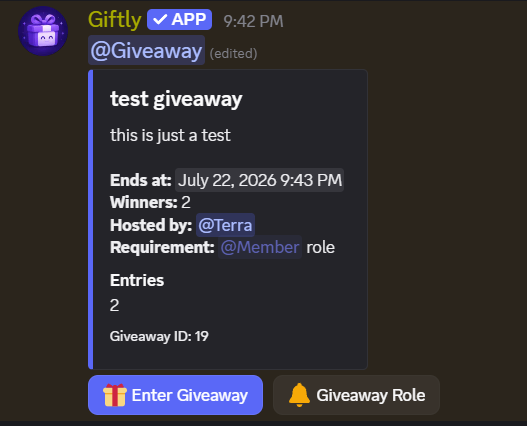
Members enter a giveaway with a single button click, and click again to leave. The entry count updates live on the giveaway embed.
Restart-Proof Timers
End times live in the database, not in memory. If the bot restarts, every overdue giveaway is drawn the moment it comes back online.
Role Requirements
Restrict entry to members with a specific role, perfect for subscriber-only, booster-only, or level-gated giveaways.
Multi-Winner Draws
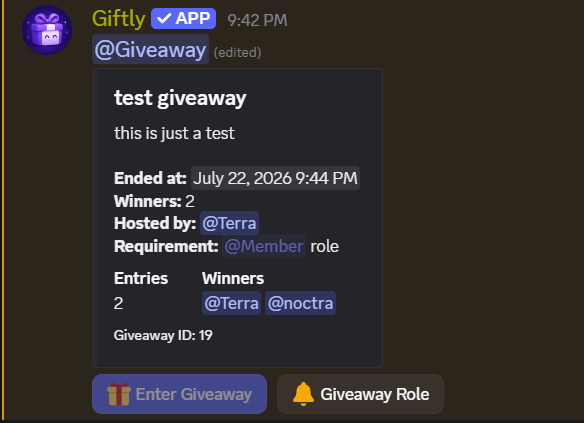
Draw up to 20 winners in one giveaway. Winners are picked randomly from entrants and announced with a ping in the giveaway channel.
Fair Rerolls
Reroll an ended giveaway to draw replacement winners, the command autocompletes your recent giveaways, so there's no ID to remember. Rerolls only draw members who are actually in the server and never re-pick a standing winner. If a winner has left, the ending announcement flags it, and because their slot is voided rather than kept, they can still win a later reroll if they rejoin.
Bonus Roles
Name any number of roles whose holders enter with 2 entries instead of 1, twice the chance to win. Holding several bonus roles is still 2, not more. The weight is fixed the moment someone enters, so a role handed out mid-giveaway never changes odds already in play, and both the live and ended embeds name the bonus roles so nobody is drawing against odds they weren't shown.
Winners, One Click Away
When a giveaway ends, its message gains a List of winners link straight to the announcement post, so the result is findable months later without scrolling the channel.
Self-Assign Giveaway Role
Set a giveaway role that gets pinged when a giveaway starts. Members grab it, or drop it, themselves, with the Giveaway Role button, which keeps working even on ended giveaways.
Manager Role & Minimal Permissions
Delegate giveaway management to a dedicated role without handing out Administrator. Giftly's invite requests only Manage Roles (for the giveaway role), channel access is granted where you want giveaways posted.
Media



How it works
Add Giftly
Invite Giftly, it requests only Manage Roles (for the giveaway role). Administrators can start giveaways immediately, or delegate with /settings set.
Start a giveaway
Run /giveaway start with a prize and duration. Optionally require a role, add a description, or pick a different channel.
Members enter
Everyone enters with one click on the Enter Giveaway button, and can self-assign the giveaway ping role with the Giveaway Role button. Holders of a bonus role enter with 2 entries.
Winners drawn automatically
When time runs out, winners are drawn and pinged automatically, even if the bot restarted in between. The giveaway message gains a link to the announcement, and you can reroll anytime.
Commands
Start a giveaway. Durations from 1 minute to 30 days, up to 20 winners.
prize, duration, winners, channel, required_role, description
Draw new winner(s) for an ended giveaway, never re-picks an existing winner. The id field autocompletes the two most recent ended giveaways.
id, winners
Cancel an active giveaway without drawing winners.
id
Configure the manager role, the giveaway ping role, and the bonus roles worth 2 entries, only the options you pass are changed, and bonus_role takes as many role mentions as you like, replacing the whole bonus list.
manager_role, giveaway_role, bonus_role
Show the current giveaway configuration.
-
Turn a single setting off (manager role, giveaway role, or bonus roles) without touching the others.
setting
Give the bot its own avatar and banner in this server only, the same way you would give it a nickname. reset:true restores the default.
avatar, banner, reset
How to use Giftly.
-
Every project with a direct link, plus free and paid ways to support them.
-
Vote for any project on top.gg, one button per bot. Free, and repeatable every 12 hours.
-
| Command | Parameters | Description | Permission |
|---|---|---|---|
| /giveaway start | prize, duration, winners, channel, required_role, description | Start a giveaway. Durations from 1 minute to 30 days, up to 20 winners. | Managers |
| /giveaway reroll | id, winners | Draw new winner(s) for an ended giveaway, never re-picks an existing winner. The id field autocompletes the two most recent ended giveaways. | Managers |
| /giveaway cancel | id | Cancel an active giveaway without drawing winners. | Managers |
| /settings set | manager_role, giveaway_role, bonus_role | Configure the manager role, the giveaway ping role, and the bonus roles worth 2 entries, only the options you pass are changed, and bonus_role takes as many role mentions as you like, replacing the whole bonus list. | Administrator |
| /settings list | - | Show the current giveaway configuration. | Administrator |
| /settings off | setting | Turn a single setting off (manager role, giveaway role, or bonus roles) without touching the others. | Administrator |
| /serverprofile | avatar, banner, reset | Give the bot its own avatar and banner in this server only, the same way you would give it a nickname. reset:true restores the default. | Manage Server |
| /help | - | How to use Giftly. | Everyone |
| /support | - | Every project with a direct link, plus free and paid ways to support them. | Everyone |
| /vote | - | Vote for any project on top.gg, one button per bot. Free, and repeatable every 12 hours. | Everyone |