
Greetit
ActiveWelcome & goodbye cards, autorole and role menus, every feature free
Greetit handles the whole first impression: an image card when members arrive, a matching one when they leave, automatic starter roles that respect membership screening, and self-assign role menus members drive themselves. Write one message to go with each card and you're done. Every part free, forever.
Features
Welcome Cards
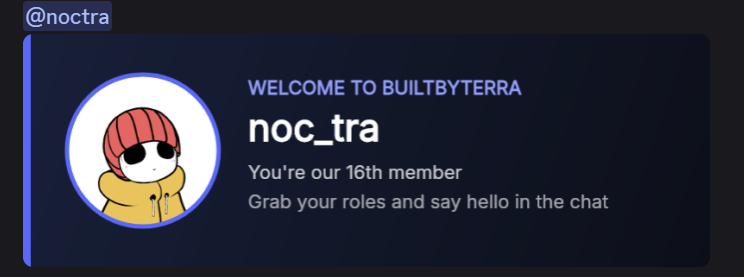
Greet every new member with a centred image card: their avatar, then "Welcome <name> to <server>", then which member number they are. Posted with a ping and the message you wrote.
Goodbye Cards
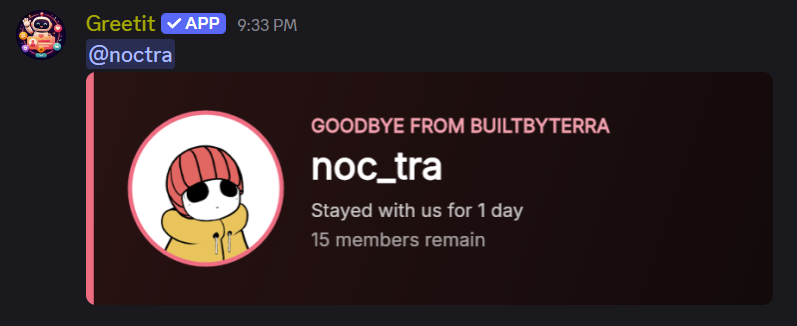
The same centred layout in a warmer colour when someone leaves: their avatar, then "Goodbye <name> from <server>", then how long they stayed. Its own channel, on or off independently.
Your Message, Safely
Both commands take a message posted alongside the card. It can mention #channels and link to channels in your own server; any other link is rejected, so a greeting can never become someone else's ad slot.
Autorole
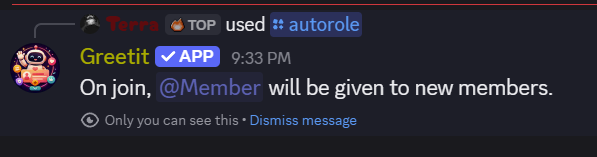
Hand out roles the moment someone joins, and wait for membership screening, so roles land only once new members are verified. Target humans or bots.
Role Menus
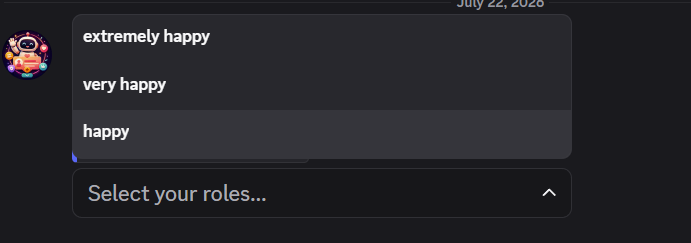
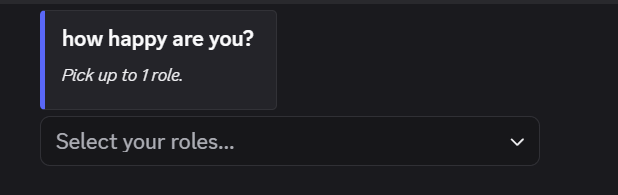
Let members pick their own roles from a dropdown, with an optional per-member pick limit. Give a menu its own description, an image in the top-right corner, and a wide image under the text. Add, remove, or reorder several roles at once by mentioning them all in one field, and edit a menu to update its live message in place.
Guardrails
Greetit refuses to save a role it can't actually assign, checks every permission before it touches a role, and applies each member's changes as a single batched request through a smoothing queue.
Shuffled Card Themes
Every welcome and goodbye card picks a background-and-accent pair at random from a hand-tuned palette, cool tones for arrivals, warm for farewells, so cards vary on their own. Or switch the background to your own server icon; Greetit checks it loads before turning that on, and falls back to the colour pairs if it ever disappears. A bundled font means cards render identically on any host.
Media
How it works
Add Greetit
Invite Greetit. It needs Manage Roles for autorole and menus, plus access to the channels you post welcomes in.
Pick your channels
Run /welcome channel and /goodbye channel with the message you want posted alongside each card. Both features stay off until a channel is set, so nothing posts until you're ready.
Add autoroles
Use /autorole action:add to give new members a starter role, Greetit waits for membership screening so the role always sticks.
Build role menus
Create a menu with /rolemenu create, add roles with /rolemenu update, then /rolemenu post it for members to self-assign.
Commands
Set the channel welcome cards post in and the message sent with them. This is what turns welcomes on.
channel, description
Set the channel goodbye cards post in and the message sent with them. This is what turns goodbyes on.
channel, description
Turn welcomes, goodbyes, or both off by clearing the channel.
feature
Use the server's own icon as the card background instead of the colour pairs. Off by default; the icon is verified before it's turned on.
enabled
Add or remove a role automatically given when members join.
action, role
Start a new dropdown role menu, max is how many roles a member may pick (0 = unlimited).
title, max
Add, remove, or sort role options, mention several roles in role to do them all in one go. Sort puts the menu in the order you mention them. Each option is labelled with the role's own name.
menu, action, role
Set the text above the roles plus a top-right thumbnail and a bottom image, both uploaded from your device. Post the menu first.
menu, description, thumbnail, image, remove-thumbnail, remove-image
Post the menu in the channel you pick; pass the channel it already lives in to refresh it in place. The menu picker lists every menu by title.
menu, channel
Delete a role menu.
menu
Give the bot its own avatar and banner in this server only, the same way you would give it a nickname. reset:true restores the default.
avatar, banner, reset
How to use Greetit.
-
Every project with a direct link, plus free and paid ways to support them.
-
Vote for any project on top.gg, one button per bot. Free, and repeatable every 12 hours.
-
| Command | Parameters | Description | Permission |
|---|---|---|---|
| /welcome channel | channel, description | Set the channel welcome cards post in and the message sent with them. This is what turns welcomes on. | Manage Server |
| /goodbye channel | channel, description | Set the channel goodbye cards post in and the message sent with them. This is what turns goodbyes on. | Manage Server |
| /settings off | feature | Turn welcomes, goodbyes, or both off by clearing the channel. | Manage Server |
| /settings server-icon | enabled | Use the server's own icon as the card background instead of the colour pairs. Off by default; the icon is verified before it's turned on. | Manage Server |
| /autorole | action, role | Add or remove a role automatically given when members join. | Manage Server |
| /rolemenu create | title, max | Start a new dropdown role menu, max is how many roles a member may pick (0 = unlimited). | Manage Server |
| /rolemenu update | menu, action, role | Add, remove, or sort role options, mention several roles in role to do them all in one go. Sort puts the menu in the order you mention them. Each option is labelled with the role's own name. | Manage Server |
| /rolemenu appearance | menu, description, thumbnail, image, remove-thumbnail, remove-image | Set the text above the roles plus a top-right thumbnail and a bottom image, both uploaded from your device. Post the menu first. | Manage Server |
| /rolemenu post | menu, channel | Post the menu in the channel you pick; pass the channel it already lives in to refresh it in place. The menu picker lists every menu by title. | Manage Server |
| /rolemenu delete | menu | Delete a role menu. | Manage Server |
| /serverprofile | avatar, banner, reset | Give the bot its own avatar and banner in this server only, the same way you would give it a nickname. reset:true restores the default. | Manage Server |
| /help | - | How to use Greetit. | Everyone |
| /support | - | Every project with a direct link, plus free and paid ways to support them. | Everyone |
| /vote | - | Vote for any project on top.gg, one button per bot. Free, and repeatable every 12 hours. | Everyone |