
quoteit
ActiveTurn any message into a quote card, every feature free
quoteit turns the good messages into something worth keeping. Right-click any message, or reply and mention the bot, and it renders a clean card of the quote, complete with the author's name and avatar, straight into your quote channel. One command to set up, and it stores nothing but the channel you picked.
Features
Right-Click to Quote
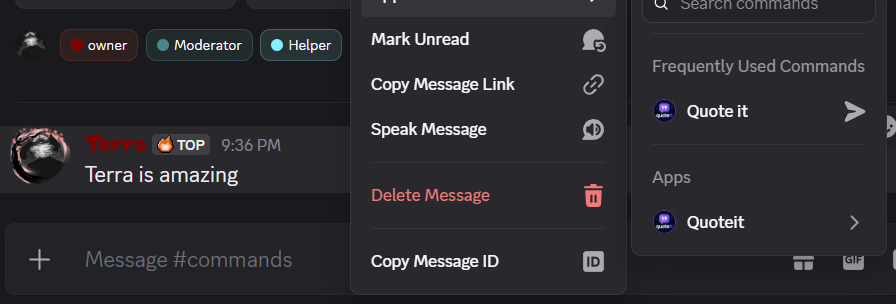
Right-click any message, pick Apps → Quote it, and quoteit renders it as a card. No command to type, no message ID to copy.
Or Just @Mention
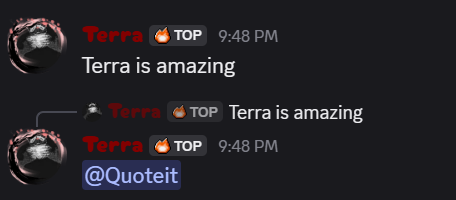
Prefer the keyboard? Reply to the message and mention quoteit. Same card, same result, whichever way is faster in the moment.
Clean Quote Cards
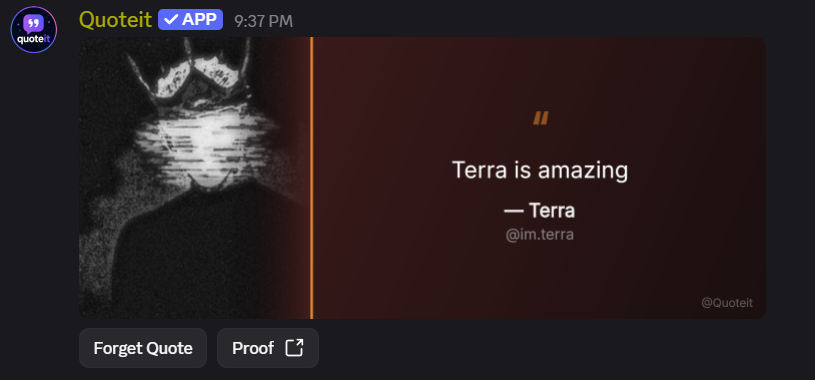
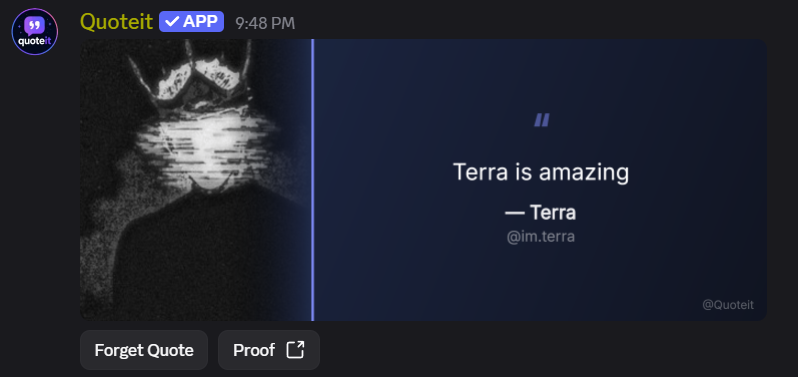
The author's avatar fills the left of the card; the quote sits centred beside it with their name and @handle underneath, and the bot's @username watermarked in the corner. Twenty color packs are picked at random, so no two quotes look alike.
Restyle Any Card
Two dropdowns on every card: twenty color packs, and twenty bundled typefaces: Inter, Playfair Display, JetBrains Mono, Oswald, Caveat, Bebas Neue, Lobster, Comfortaa, Poppins, Bree Serif, Abril Fatface, Anton, Pacifico, Permanent Marker, Space Mono, Amatic SC, Righteous, Archivo Black, Alfa Slab One and Audiowide. Pick one and the card is re-rendered in place, never re-posted. Anyone can, on any card, any time.
Your Own Defaults
/quoteit preference lets any member pick the colors and typeface used whenever they get quoted. It follows them into every server quoteit is in, and anyone can still restyle the posted card afterwards.
Proof Button
Every card has a Proof button that jumps straight to the original quoted message, not the trigger, so anyone can check the quote is real, in context.
Forget Quote
Every card also has a Forget Quote button that only the quoted member can use. One confirmation and the card is gone. Nobody is stuck being immortalised.
Posted and Linked
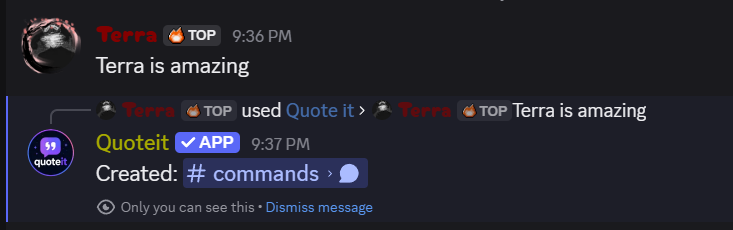
The card lands in the channel you picked, and whoever quoted it gets a link straight back to the card, so nothing gets lost in a busy server.
Almost Nothing Stored
quoteit saves two things: which channel your cards go to, and each member's own color and font preference if they set one. No message text, no authors, no history. The card is rendered and the text is gone.
One-Command Setup
Run /quoteit channel and you are done. Check it any time with /quoteit status, or turn quoting off with /quoteit disable.
Media
How it works
Add quoteit
Invite quoteit. It needs View Channel, Send Messages, Attach Files, and Embed Links in your quote channel, nothing server-wide.
Pick a quote channel
Run /quoteit channel and point it at wherever cards should land. Quoting stays off until you do, so nothing posts by surprise.
Quote a message
Right-click any message and choose Apps → Quote it, or reply to it and mention quoteit. Both do exactly the same thing.
Card posts, you get a link
quoteit renders the card, drops it in your quote channel, and replies with a link straight to it. Use the Color and Font dropdowns to restyle it, or set your own defaults with /quoteit preference. Nothing about the message is kept.
Commands
Turn the message you right-clicked into a quote card.
right-click → Apps
Reply to a message and mention quoteit to quote it.
reply + mention
Set the channel quote cards are posted to. This is what turns quoting on.
channel
Show which channel cards are currently posted to.
-
Turn quoting off by clearing the channel.
-
Pick the color pack and typeface used whenever you get quoted. Leave either on "No preference" for random colors and the default font.
color, font
Give the bot its own avatar and banner in this server only, the same way you would give it a nickname. reset:true restores the default.
avatar, banner, reset
How to use quoteit.
-
Every project with a direct link, plus free and paid ways to support them.
-
Vote for any project on top.gg, one button per bot. Free, and repeatable every 12 hours.
-
| Command | Parameters | Description | Permission |
|---|---|---|---|
| Quote it | right-click → Apps | Turn the message you right-clicked into a quote card. | Everyone |
| @quoteit | reply + mention | Reply to a message and mention quoteit to quote it. | Everyone |
| /quoteit channel | channel | Set the channel quote cards are posted to. This is what turns quoting on. | Manage Server |
| /quoteit status | - | Show which channel cards are currently posted to. | Manage Server |
| /quoteit disable | - | Turn quoting off by clearing the channel. | Manage Server |
| /quoteit preference | color, font | Pick the color pack and typeface used whenever you get quoted. Leave either on "No preference" for random colors and the default font. | Everyone |
| /serverprofile | avatar, banner, reset | Give the bot its own avatar and banner in this server only, the same way you would give it a nickname. reset:true restores the default. | Manage Server |
| /help | - | How to use quoteit. | Everyone |
| /support | - | Every project with a direct link, plus free and paid ways to support them. | Everyone |
| /vote | - | Vote for any project on top.gg, one button per bot. Free, and repeatable every 12 hours. | Everyone |