
Tickit
ActiveSupport ticket management for Discord
Tickit brings structured support ticket management to your Discord server. Fully custom ticket categories, automatic transcripts, and a clean slash command setup let your staff focus on helping users instead of managing chaos.
Features
Custom Ticket Categories
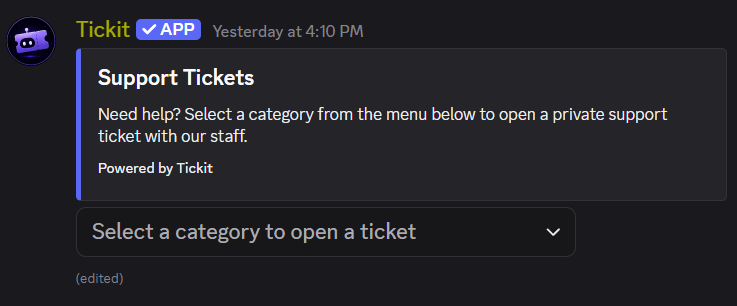
Create up to 5 fully custom categories per server, each with its own label, emoji, description, any number of staff roles, and Discord category. Servers without one common staff role just mention several. The category emoji can be Unicode or a custom emoji from any server. Members open tickets straight from a menu on the panel.
Your Panel, Your Words
Set the panel embed's title and description in /setup, and upload an image, GIF, or video (up to 5 MB) straight from your phone or desktop, no image host, no link to paste. Re-run /setup as often as you like: anything you don't pass again is kept, media included. Change any of it later with /settings panel modify. Leave a field empty and Tickit uses its own copy.
Custom First Message
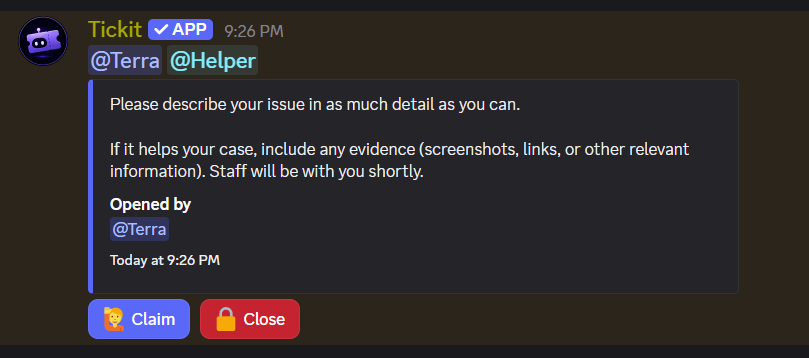
/ticket-message sets the title and text of the embed a new ticket opens with, separately for every category. The opener and every staff role are always pinged above it, whatever the text says.
Automatic Transcripts
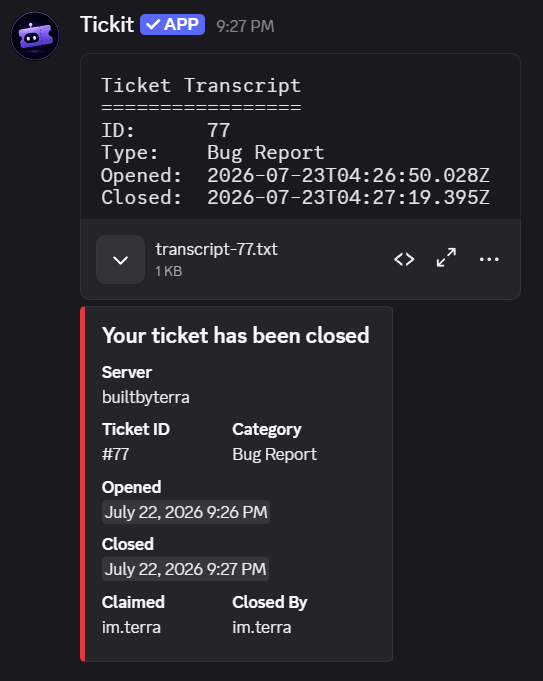
Every message inside a ticket channel is logged in real time, edits included, the transcript shows what a message ended up saying, marked as edited. When a ticket is closed, the full transcript file is attached to the log entry and DMed to the ticket opener.
Staff Claim System
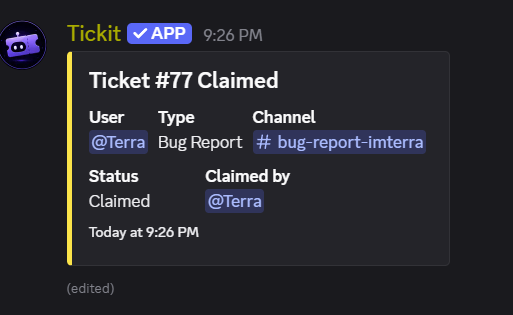
Staff can claim an open ticket to signal ownership. The log embed updates to yellow and shows who claimed it, preventing duplicate responses.
Private Channels
Each ticket creates a dedicated private channel, visible only to the opener and that category's staff roles. Everyone else is locked out by default, and the channel topic shows when it was opened and by whom.
Close Policy Per Category
Decide per category whether members close their own tickets outright or only request a close, so General Reports can be self-closable while Serious Matters still need staff. Request-to-close is the default: Tickit confirms with the member, then pings staff with Approve and Deny buttons.
Color-Coded Log Channel
Every ticket lifecycle event posts to a dedicated log channel with color-coded embeds: green when opened, yellow when claimed, red when closed.
Minimal Permissions
Tickit requests zero server-wide permissions on invite. You grant access only where it works (the panel channel, log channel, and ticket categories), and /setup tells you exactly what's missing and where.
Media
How it works
Add Tickit
Invite Tickit. It requests no server-wide permissions. Grant it access on your panel channel, log channel, and ticket categories only.
Create categories
Use /settings category add to define each ticket category: a Discord category, label, emoji, as many staff roles as you need, and whether members may close their own tickets in it.
Run /setup
Pass your panel and log channels. Add a title, description, or an uploaded image, GIF, or video to make the panel your own. Tickit posts it with a category menu instantly.
Manage tickets
Members pick a category to open a ticket. Staff claim and close them; openers close or request a close depending on that category. Transcripts land in DMs and the log.
Commands
Creates a new ticket category with any number of staff roles (mention them all in one field), its own Discord category, and its own close policy. Emoji can be Unicode or a custom emoji from any server. Up to 5 categories per server.
parent, label, role, member-close (optional), description (optional), emoji (optional)
Autocompletes your configured categories. Pick one to permanently remove it.
parent
Change an existing category's label, staff roles, close policy, Discord category, description, or emoji. Any role you pass replaces the whole staff role list.
parent, label, role, member-close, new-parent, description, emoji
Displays all configured categories with their roles, close policy, Discord categories, and descriptions.
None
Change the panel embed or swap its uploaded media after setup, without re-posting the panel. Pass "none" to a text option to restore the default.
title, description, media, remove-media
Shows the current panel embed text, media, and channels.
None
Posts the ticket panel and saves the log channel. The optional title, description, and uploaded media customise the panel; type \n for a line break. Requires at least one category first.
panel, log, title (optional), description (optional), media (optional)
Sets the title and text of the first embed posted inside a new ticket, per category. Run it with just a category to see the current wording.
category, title (optional), description (optional)
Staff close the ticket and deliver the transcript. Depending on that category's close policy, the opener either closes it too or sends staff a close request.
None
Give the bot its own avatar and banner in this server only, the same way you would give it a nickname. reset:true restores the default.
avatar, banner, reset
How to use Tickit.
None
Every project with a direct link, plus free and paid ways to support them.
None
Vote for any project on top.gg, one button per bot. Free, and repeatable every 12 hours.
None
| Command | Parameters | Description | Permission |
|---|---|---|---|
| /settings category add | parent, label, role, member-close (optional), description (optional), emoji (optional) | Creates a new ticket category with any number of staff roles (mention them all in one field), its own Discord category, and its own close policy. Emoji can be Unicode or a custom emoji from any server. Up to 5 categories per server. | Administrator |
| /settings category remove | parent | Autocompletes your configured categories. Pick one to permanently remove it. | Administrator |
| /settings category modify | parent, label, role, member-close, new-parent, description, emoji | Change an existing category's label, staff roles, close policy, Discord category, description, or emoji. Any role you pass replaces the whole staff role list. | Administrator |
| /settings category list | None | Displays all configured categories with their roles, close policy, Discord categories, and descriptions. | Administrator |
| /settings panel modify | title, description, media, remove-media | Change the panel embed or swap its uploaded media after setup, without re-posting the panel. Pass "none" to a text option to restore the default. | Administrator |
| /settings panel view | None | Shows the current panel embed text, media, and channels. | Administrator |
| /setup | panel, log, title (optional), description (optional), media (optional) | Posts the ticket panel and saves the log channel. The optional title, description, and uploaded media customise the panel; type \n for a line break. Requires at least one category first. | Administrator |
| /ticket-message | category, title (optional), description (optional) | Sets the title and text of the first embed posted inside a new ticket, per category. Run it with just a category to see the current wording. | Administrator |
| /close | None | Staff close the ticket and deliver the transcript. Depending on that category's close policy, the opener either closes it too or sends staff a close request. | Staff / opener |
| /serverprofile | avatar, banner, reset | Give the bot its own avatar and banner in this server only, the same way you would give it a nickname. reset:true restores the default. | Manage Server |
| /help | None | How to use Tickit. | Everyone |
| /support | None | Every project with a direct link, plus free and paid ways to support them. | Everyone |
| /vote | None | Vote for any project on top.gg, one button per bot. Free, and repeatable every 12 hours. | Everyone |